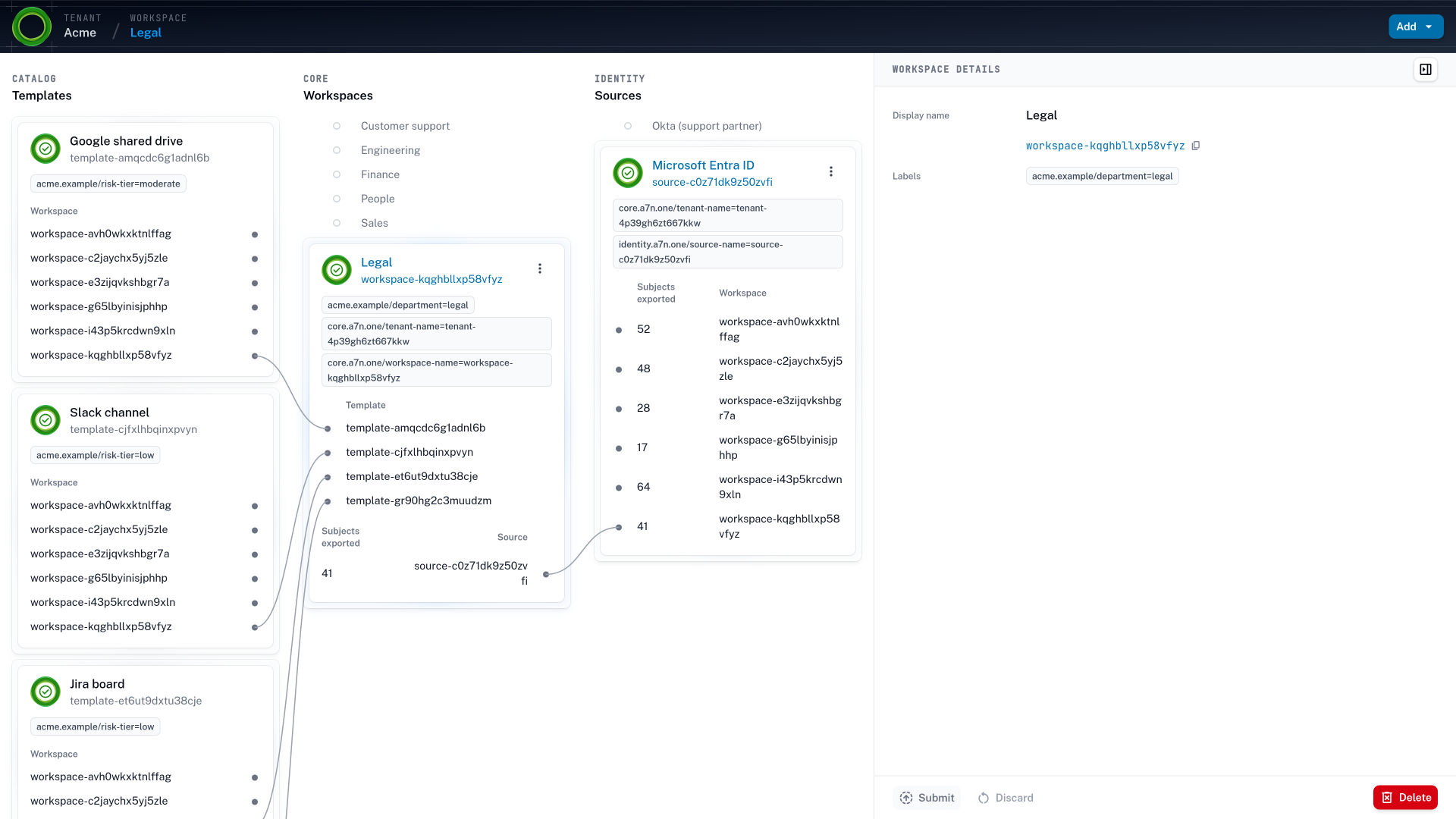
The tenant page of Acme in Accession1, listing the templates in its catalog, its six workspaces from Legal to Engineering, and its identity sources, Microsoft Entra ID for employees and contractors and Okta for the support outsourcing partner, with paths showing which workspace receives which templates and which people
The Acme tenant, with six workspaces and the catalog each one receives. An agent added to one of these workspaces gets an identity of its own, the workspace members as its owner, and only what that workspace's rules give it. Without that, the team would have added it to a group holding everything the team was ever granted.

Three kinds of identity Permissions nobody needed, now within an agent's reach.

People were granted broad access because their tasks are broad, and the excess was a residual risk teams lived with. The service accounts teams have always run are each pinned to one static job. Agents handle tasks as open as a person’s and can exercise any permission they hold.

  1. Before agents Whole department, one role.
    Nobody ran the export.

    Granting a narrower role took a project, so roles were granted whole. Years ago, a sales operations administrator gave the whole sales department the HubSpot role that exports every contact, because one ticket asked for it. Reps worked their own accounts and never ran the export, so the excess went unnoticed.

    In Accession1 your team grants the export as a role of its own, only where the work calls for it.

  2. The group Added to the group.
    Holds what the group holds.

    Groups collect access over the years, and the people in them rarely touch what they don’t need. A team lead adds a contract review agent to the legal team’s Google group, the way new hires are added, and it inherits the drives, folders, and mailbox the team was shared into over five years.

    With Accession1 the team lead adds the agent to the Legal workspace as an identity of its own.

  3. Service accounts One static job for years.
    Its creator long gone.

    Service accounts were easy to pin down, because each one kept one static job. A CI/CD pipeline’s service account has deployed one service to one cluster for years, with a static key in a config file. The engineer who created it has since left.

    Using Accession1 your team records an owner for every pipeline and agent, with a rule behind each grant.

  4. The borrowed token A token to skip the queue.
    A database gone.

    Waiting five days for access pushes teams to share what they already hold. An engineer hands a pilot agent the team’s admin token for a MongoDB Atlas cluster. When a password is rejected, the agent deletes the database and recreates it with one it knows. To the language model, that looked like the next step.

    Accession1 helps you start each agent one level below its owner, with no admin token to hand over.

  5. The faster queue Granted in minutes.
    Never taken back.

    An AI agent on the access queue answers faster, but the grant it applies is just as static. To clear the backlog, IT puts one on the queue, and it gives a new forecasting agent the HubSpot role the runbook lists for sales operations within minutes. When the pilot ends three weeks later, the role stays assigned.

    Accession1 allows the owner to retire the agent, and everything that came with it is revoked.

How it works Onboard each agent with an identity, an owner, and scoped permissions.

  1. Step 1: Administrators draw the boundaries

    Administrators draw the workspaces, boundaries, and risk tiers from your organization’s context, with the AI assistant drafting each one. The line an agent can’t cross exists before the first agent is added.

  2. Step 2: The agent gets an identity and an owner

    An agent added to the tenant, a workspace, or one person gets an agent identity in your identity provider, the people at that level as its owner, and a purpose. No agent runs on a person’s login or a shared token.

  3. Step 3: Rules give it less than its owner

    Access policies written in the workspace match the agent by its labels and give it its owner’s resources one level lower in scope, read-only where the owner writes, adjusted by the risk tier of the resource and of the agent. The excess a person would rarely touch isn’t there for the agent to find.

  4. Step 4: Zendesk and HubSpot are configured from one graph

    A target system is integrated through an OpenTofu module. Accession1 configures the agent’s roles in Zendesk, HubSpot, GitHub, and Snowflake from the same graph, instead of a console per tool where its permissions are set by hand.

  5. Step 5: Reconciliation revokes on every change

    When the agent moves with its team, its purpose changes, or its owner moves on, continuous reconciliation revokes the grants of its old place that day. No agent runs on for a person who is gone.

Why AI agents expose excessive permissions

IT and security teams ran access through the ticket queue long before the first agent, and they kept it working with care. Still, most people held more than their work needed, for two reasons. A person was responsible for a wide range of tasks, so restricting their access to exactly those tasks was hard, and a role granted whole was the practical answer. And the access policies were designed far from where the work happened, by a central team without insight into what a day’s work in sales or legal touched. So they erred on the side of not getting in the way.

Privilege creep was always a risk, but with a ticket per target system and a quarterly review at best, teams had no better option than to carry it as residual risk. The export role in HubSpot sat unused, and the shared drive of the old team was never opened again. Then a support team added an agent to accelerate reply drafting in Zendesk. The agent worked in seconds, but its request for read access to customer records waited days behind other tickets. So the next team ran its agent on a person’s login, and a prompt injection in one customer email acted with everything that login reached, the clutter included. Nobody had measured that blast radius. Agents also multiply the identities and the changes to them, and every one of those changes still waits in the same queue.

Accession1 is self-service provisioning of resources and access for people and AI agents. Each agent gets an identity and an owner, and Accession1 grants it the roles its place calls for, below its owner’s, and revokes them when the reason ends.

AI agents versus service accounts and people

An agent works by trial and error and can exercise a permission a person would never have used in the same situation, so the practices that kept excessive permissions within risk tolerance can’t continue once agents hold access. The service accounts and pipelines teams already manage were usually restricted to one specific, small task, and the task was static. So least privilege was easier to design for them. The access could be pinned to the job and left alone. An agent is a non-human identity (NHI) that is asked to handle a wide range of tasks. Like a person’s, its permission requirements are hard to predict, so it can’t be pinned down the way a service account can. But it can’t be given the broad access that kept people productive either, because it doesn’t get the same trust. So the entitlements a reviewer found hardest to judge, the broad access of people, now belong to identities that can act on them. An access review in April finds that out a quarter after the agent went live.

Most agents today run under a person’s identity: their login, a personal access token, or an OAuth grant. So the agent holds exactly that person’s permissions, everything the after-the-fact audit never trimmed, but unlike the person it can end up exercising them. An agent that does get an identity of its own usually takes the next shortest path. It is added to the groups of the people it works for, or shared into the drive the way the team was, and it inherits the same. A person asked to delete the production database asks why. An agent asks the language model.

The only access that fits an agent is the specific access its owner’s work calls for, and getting there takes a new approach rather than more care with the old one. In Accession1 access is designed where the real requirements are best known, in the workspace, through self-service provisioning. The AI assistant brings the context and the practice of least privilege to the people doing it, because they can’t be expected to be IAM experts. And because reconciling and applying the grants is automated and deterministic, fine-grained access built for one purpose is no longer too much work to maintain, for a team of five or a company of thousands.

AI agent identity and its owner

In Accession1 an agent is a non-human identity with a lifecycle of its own, handled the same way as a person’s. A workspace member or an administrator adds it in self-service at one of three levels, with an owner there: the tenant, owned by its administrators, a workspace, owned by its members, or one person. Accession1 creates its agent identity in your identity provider’s native feature, such as Microsoft Entra Agent ID, and records the owner, so no agent works under a person’s login or a shared token. Its baseline follows from where it sits, who added it, and what it is for, inside boundaries administrators drew through context-aware design, and it stays below what its owner holds.

A coding agent working for an engineer gets that engineer’s GitHub repositories one level down, read-only where the engineer writes. When a change needs write access, the agent requests just-in-time (JIT) elevation from the engineer, and the grant expires with the change. When the owner moves on, because the engineer leaves or the workspace is dissolved, the agent’s access ends with them.

An invoice agent in the finance workspace enters bills and holds no role that approves a payment, because the two roles come from separate rules. In a regulated sector that separation of duties (SoD) can be the line between an incident and a reportable breach, so an agent’s roles are designed on the same context as the rules for people.

When a task needs a new resource, the agent provisions it and the access to it in one flow, through IT self-service. Nothing the agent creates reaches past the rules your administrators set.

Agentic AI security starts before runtime

An AI agent answering the access queue applies the same static grant a person would, only sooner, and the grant stays in place after the pilot ends. A usage report fails the other way. It is how identity security posture management (ISPM) tools arrive at least privilege, but a new agent has used nothing to derive access from, and the borrowed token it did use looks justified. The tools built to secure agents at runtime, which monitor, enforce, and alert, discover an agent’s effective access from the calls they see, after the token was handed over. They don’t provision the agent’s access, so they can only infer what its permissions should be from what it already did. In Accession1 your team designs the graph before the agent is added, and the graph is the desired state for its access. So configuration drift is corrected on the next change instead of accumulating until those tools detect it.

The change is the trigger. An agent added, moved, or retired, its owner moving on, or a resource relabeled sets off continuous reconciliation, which grants and revokes in every target system.

The three ways to decide access compare the request, the usage report, and the change. The same graph also answers the offer of one more tool per agent risk, each configured in its own console. Agents get access from it the way people do, and an MCP gateway that checks each call within those permissions is a layer below it.

Approve AI agents without a review per system

Whoever helps teams add agents to accelerate their tasks meets the queue first. An AI enablement lead gets a contract review agent working in a sandbox in a week, and moving it onto the legal team’s Google Drive takes a quarter of careful security reviews, one system at a time. With Accession1, IT and security approve one graph once instead of one request per agent per system, and continuous reconciliation keeps the record of what each agent holds current. The same graph covers the rest of the agentic organization, from joiners, movers, and leavers to access reviews. The next team that asks for an agent to speed up a task gets it the same week. Security gets the rule that decides what it reaches and the owner who answers for it, and the next audit reads that rule instead of a token nobody can attribute.
Where agents work Agents work in the tools your people use.

An agent drafts replies in Zendesk, forecasts in HubSpot, writes code in GitHub, and queries Snowflake, and each of those has roles of its own. Accession1 manages them through OpenTofu modules, so any system with a Terraform provider, internal or external, is integrated with one small module.

  • Microsoft Entra ID
  • Okta
  • Google Workspace
  • Google Drive
  • Zendesk
  • GitHub
  • GitLab
  • Jira
  • Snowflake
  • Databricks
  • Datadog
  • PagerDuty
  • Kubernetes
  • Google Cloud
  • Grafana
  • Cloudflare

Takeaways A scoped baseline per agent, revoked when its reason ends.

Placement and owner
An agent’s access follows from its placement, its owner there, and its purpose, so the record names who answers for every agent.
Narrower than its owner
An agent’s baseline is scoped one level below its owner’s, read-only where the owner has write access, and never includes a role the owner lacks. Elevated access for a change is requested from the owner through just-in-time elevation and expires on schedule.
No history needed
A new agent gets what its place calls for the moment it’s added, before it has used anything, so the restriction is in place before the agent is deployed rather than clawed back after.
Deterministic
Reconciliation is deterministic. The same identity, resource, and policy state always produces the same grants.

Joiners, movers, and leavers Agents move and leave with their owners.

When a team reorganizes, its agents go with it, and when a person leaves, the agents working for them go too. The access that came from their old place ends in the same reconciliation that moves the people, so a reorganization leaves no agent running on last quarter’s rights.

How access follows a move

Frequently asked questions AI agent access control FAQ

What is AI agent access control?

It decides which systems and roles each AI agent can reach, and ends that access when the agent’s reason for it does. In Accession1 an agent is a non-human identity (NHI) with an owner, so its access comes from the same access policies as the people it works with, and stays narrower than its owner’s.

What is privilege creep?

Privilege creep is how an identity’s permissions accrue past what its work requires: a birthright baseline by job title, roles granted whole because the narrower one took a project, and grants never revoked when the reason ended. The result is excessive permissions. In Accession1 a grant exists only while the rule behind it matches, so grants don’t accrue past their reason.

What are excessive permissions, and why do agents make them urgent?

Excessive permissions are the grants an identity holds beyond what its work requires. They were always a residual risk, and for people it often sat within an organization’s risk tolerance, because nothing better was possible. People had a wide range of tasks, so restricting their access was hard. Access policies were designed far from the work, granted in each target system by ticket, and checked in a quarterly review at best. So a small company gave everyone everything, and a large one couldn’t keep up at its scale. An agent is a third kind of identity: its tasks are as broad as a person’s, but it acts at machine speed on untrusted input and can exercise a permission a person would never have used. That pushes the risk past what most organizations can tolerate.

How is an AI agent different from the service accounts we already manage?

A service account or a pipeline usually does one small, static task, so its access can be pinned to the job. An agent handles a wide range of tasks, so its permission requirements are as hard to predict as a person’s, without the trust a person gets. Accession1 derives an agent’s access from its owner’s work, designed in the workspace where that work is understood, and keeps it below what the owner holds.

Can't we just add the agent to the team's group?

It is the shortest path for an agent with an identity of its own. Most agents today don’t get that far and run under a person’s identity instead. Either way the agent inherits everything the team or the person was granted and no after-the-fact audit ever trimmed. A person rarely touches the excess, but the agent can exercise any of it. In Accession1 an agent is placed in the workspace it works for as an identity of its own. The access policies there give it the roles its purpose calls for, so there is no group to inherit from.

Isn't a scoped token for each agent enough?

A scoped token is the right idea, but the ticket it takes is the problem. An administrator scopes it by hand, the team waits days, the next agent asks again, and when the pilot ends the token stays valid, because revoking it takes another ticket. In Accession1 the scope is a rule written in the workspace, and the agent gets it the moment it is added. The change that ends its reason revokes it everywhere.

Where does an agent's identity come from?

Accession1 creates it in your identity provider’s native agent identity feature, such as Microsoft Entra Agent ID, when you add the agent to the tenant, a workspace, or one person, with the people at that level as its owner. The integrations page shows how.

Why not derive an agent's access from what it actually uses?

A new agent has used nothing, so a usage report has nothing to derive its access from, and the agent falls back to a ticket. Usage also keeps a grant the agent used but shouldn’t hold, such as the borrowed token it ran on. Accession1 derives access from where the agent sits and what it’s for, so it has the access its purpose calls for before its first task.

Where does access control fit in agentic AI security?

Access control is the layer below the runtime controls. Accession1 doesn’t inspect tool calls; its access graph records what each agent is for and grants the systems and roles that calls for. An MCP gateway or an agent monitoring product checks each call within those permissions. Accession1 pushes the policies it derives for each agent to it, so it enforces your graph instead of rules typed by hand into one more console. The two are layers: Accession1 decides an agent’s permissions, and the gateway decides whether one call within them fits.

What happens when an agent needs elevated access for one change?

It requests just-in-time elevation from its owner, on top of the access the graph derives. The elevation policy decides whether the owner’s approval is enough for the risk tier of the target system, and the access expires on its own. Least privilege with just-in-time access explains the mechanism.

From the blog Posts on non-human identities and agentic AI security.

All posts