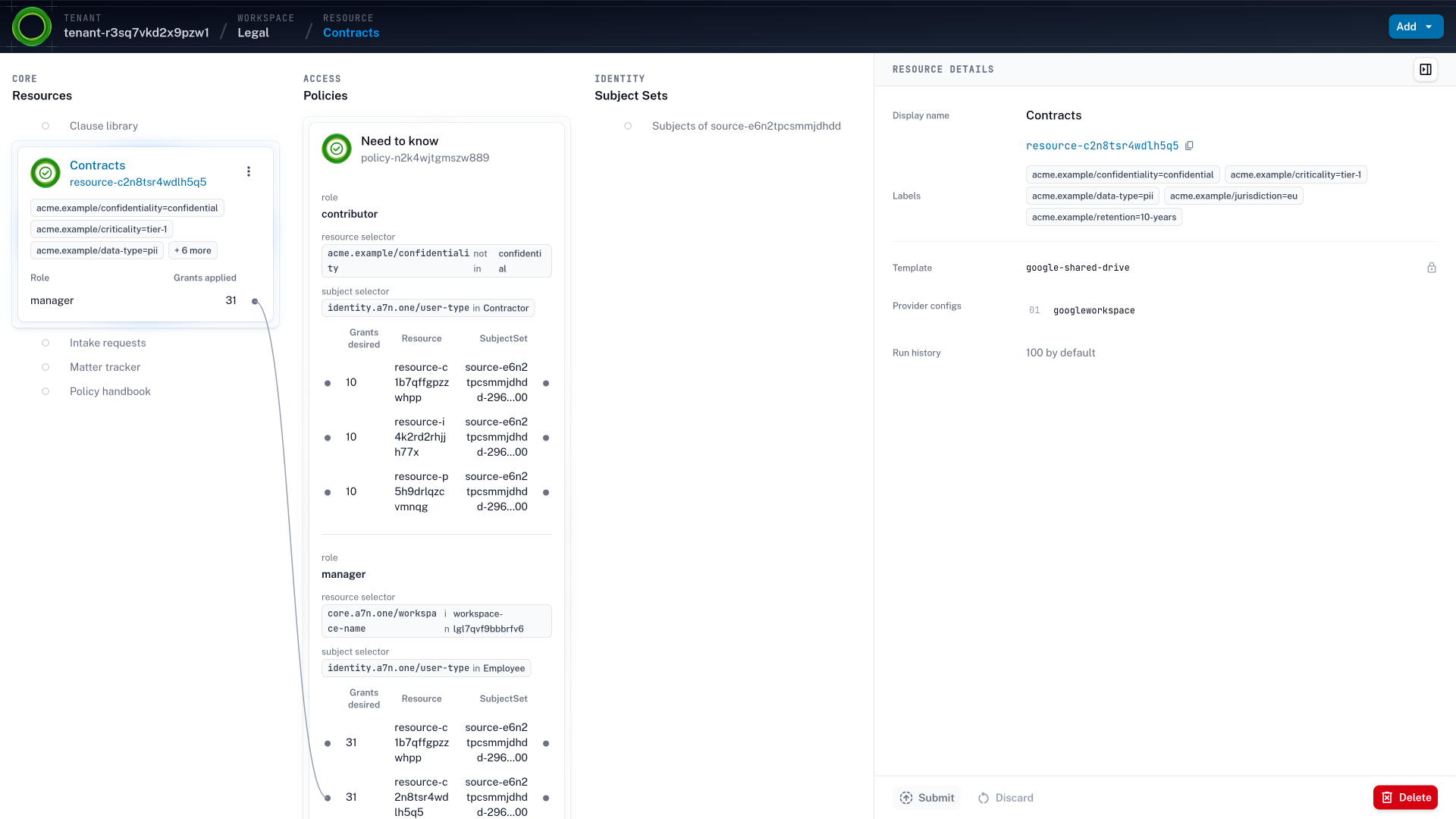
The Contracts shared drive selected in the Legal workspace in Accession1, showing its confidentiality and criticality labels, its google-shared-drive template, the grants on it, and the access policy rules that produce them
The Contracts shared drive in Legal. One rule gives Legal's employees the manager role the work calls for and gives contractors nothing, because the drive is labeled confidential. The grants are what the rule produces today, and a privileged role beyond them is a just-in-time elevation that expires.

Standing privileges Excessive permissions outlive the work they were granted for.

A role is handed over in full because the narrower one would take a project. The request process has no step that revokes it. The standing roles belong to people, to the service accounts teams have always run, to the emergency account everyone shares, and now to agents.

  1. Before agents One ticket for admin.
    Admin for three years.

    A narrower role takes a review, so a ticket for one fix grants the whole role. A platform engineer gets the AWS administrator role to fix one deployment on a Friday, and three years later it is still there, used twice.

    Accession1 allows workspace members to grant the role the work calls for, and the one-off expires as a just-in-time elevation.

  2. Service accounts One task, long finished.
    Admin on every clone.

    Service accounts made for one-off work keep their roles after the work ends, because nobody owns them. A deployment pipeline’s service account holds one role on one cluster. The accounts cloned from it for one-off migrations hold the cluster administrator role, with a key in a config file.

    Using Accession1 your team gives each pipeline an owner and a rule, so a finished migration retires its account.

  3. Agents The export nobody ran.
    Until an agent did.

    An agent that inherits a department’s role can use parts of it no person ever touched. A forecasting agent in the sales workspace inherits the HubSpot role with the export no rep ever used, and a prompt injection in a lead’s notes makes it export every account.

    Accession1 helps you give the agent less than its owner holds, and no rule grants it the export.

  4. Emergency account Shared for emergencies.
    Opened, never reviewed.

    A shared emergency account is standing access with a better name, held by everyone and owned by no one. An on-call engineer reaches the production database at night through it. Its password sits in a vault, and nobody reviews its use.

    In Accession1 the on-call engineer requests break-glass access under their own identity, and the grant expires on its own.

  5. Right-sizing Cut what wasn't used.
    Keep what shouldn't be.

    Trimming by usage keeps whatever is still used and has nothing to say about what is new. A usage report recommends removing the permissions nobody used and keeps the pilot’s shared token, because an agent calls it every day.

    With Accession1 workspace members design access before anything is used, and an access review checks the rule.

How it works Standing access for daily work, privileged roles just in time.

  1. Step 1: Rules start from unprivileged defaults

    Workspace members write the access policies of their workspace, which assign only the roles the work calls for. The AI assistant brings the context and the practice of least privilege to each draft.

  2. Step 2: The risk tier draws the line

    Administrators set a risk tier per template from system criticality and data sensitivity, and the AI assistant drafts it from your organization’s context. A contractor gets nothing on a confidential drive, and a critical system gives an agent less than a routine one.

  3. Step 3: Roles map to each system's own permissions

    A target system is integrated through an OpenTofu module that maps each template’s roles to the system’s own permission model. The administrator role in Google Cloud and the export role in Snowflake are roles a rule gives or withholds.

  4. Step 4: Just-in-time access for privileged roles

    A person who needs a privileged role for one change, or an agent whose task needs a role its standing access doesn’t include, requests just-in-time elevation in self-service. The access expires on its own.

  5. Step 5: Approval follows the risk tier

    The elevation policy administrators wrote decides from the risk tier of the target system whether approval is automatic or comes from a workspace peer or a tenant administrator. Break-glass access is the same path for an incident.

AI agents turn excessive permissions into active risk

IT and security teams granted roles whole long before the first agent. A person had a wide range of tasks, so pinning access to exactly those tasks was hard, and the narrower role took a project while the ticket was due that day. Access policies were written far from the work, by a central team without insight into what a day in finance or legal touched, so they erred on the side of not getting in the way. Privilege creep did the rest: a role, once assigned, stayed until a review happened to catch it. The teams that ran it kept a list of the privileged roles, reviewed what they could, and carried the rest as residual risk.

That risk was tolerable while people held the excess, because a person rarely touched it. An agent handles tasks as wide-ranging as a person’s, gets none of a person’s trust, and can exercise any permission it holds, including after a prompt injection. So least privilege stopped being a principle to aspire to and became the condition for letting an agent in. In an agentic organization a team adds agents faster than any review trims what they inherit.

Accession1 is self-service provisioning of resources and access for people and AI agents. Workspace members grant the roles their work needs inside boundaries administrators set, and Accession1 revokes them when the reason ends.

Least privilege designed where the work is known

Access designed from the org chart comes out generic. A baseline by job title fits nobody’s actual work, so it comes out too wide to be safe or too narrow to work, and the wide version wins. In Accession1 the access policies are written in the workspace, by the people who know who does what, through self-service provisioning. The AI assistant brings the context and the practice of least privilege to the workspace member writing the rule, because workspace members can’t be expected to be IAM experts. An agent’s baseline comes from its placement: one level below its owner’s, read-only where the owner writes, and never a role its owner lacks.

The risk tier of each template, from system criticality and data sensitivity, draws the line a rule can’t cross, and a critical system gives an agent less than a routine one. The rules administrators set through context-aware design are the ceiling, and nothing a workspace member or an agent creates reaches past them. Continuous reconciliation applies the rules on every change, in every system a module connects. So fine-grained access built for one purpose is no longer too much work to maintain, and too much work is the reason it was never kept before.

Just-in-time elevation and break-glass access

Least privilege by rule leaves the one-offs. An engineer needs a privileged role for one release, a records manager reopens a closed client file for one subpoena, and an agent’s task needs a role its standing access doesn’t include. Those used to be the tickets that granted a role whole and never took it back, or the standing administrator account everyone shared for emergencies.

In Accession1 each is a just-in-time (JIT) elevation, a temporary grant with an end date on top of what the graph derives. The same reconciliation that follows labels removes the grant on that date, with no label change needed, so the elevation never outlives the change it was requested for. It is one mechanism for a person, an agent, and an incident, requested in self-service inside the workspace, so the request never becomes a ticket and the grant never becomes standing access. The industry sells just-in-time access as a product of its own. Here it is the exception path of the same access graph, written on the same context and labels as everything else, so an elevation reaches nothing the administrators’ rules keep out.

An incident needs access faster than any approval, and most organizations keep a shared emergency account for it. In Accession1 break-glass access is the emergency path of just-in-time elevation, the same mechanism with a shorter route. It is granted to one identity, recorded as a grant with its reason, and expires like any other elevation. A clinician reaching a record outside the ward and an on-call engineer reaching a production database at night go through the same door. The review afterwards reads the grant instead of a vault log.

A human in the loop where the risk calls for one

Who approves an elevation follows from the risk tier of the target system, not from who happens to be on the queue. The elevation policy, written by administrators on the same context and taxonomy as everything else, approves low-risk requests automatically against the rules, routes mid-risk ones to a workspace peer, and sends high-risk ones to a tenant administrator. So the human in the loop is there where it matters and absent where it would only slow the work down. The AI assistant never takes that decision. It helps write the elevation policy and answers questions about the elevations in effect, and reconciliation applies the result deterministically.

Why access requests and right-sizing fall short

A request grants a role whole, and revoking it takes a request of its own, which rarely follows. A timer ends it on a date instead of with its reason, so the next task asks again. Right-sizing from a usage report trims what wasn’t used and keeps what was. Identity security posture management (ISPM) and cloud infrastructure entitlement management (CIEM) tools arrive at least privilege this way. The pilot’s shared token survives because an agent still calls it, and a new agent with no usage to derive from falls back to a ticket. Those tools don’t provision the access, so they infer what it should be from activity after the grants were made. In Accession1 the graph is designed and drives the access, and the change is the trigger. A rule gives an identity what its place and purpose call for the moment it exists, and an elevation ends when its time does. Relabeling a resource, retiring an agent, or deactivating a leaver in the identity provider revokes the grants in every target system in the next reconciliation. Why that holds against both alternatives is the three ways to decide access.

Less attack surface, smaller blast radius

Every standing role nobody needs is a way in for whoever obtains the credential. Everything a compromised identity can reach is its blast radius. Least privilege by rule shrinks both, for a person who rarely touches the excess, for a service account whose key outlives its project, and for an agent that can exercise anything it holds. An elevation that expires leaves no privileged role behind for the next prompt injection to find. The next access review reads the rules and the elevations in effect rather than a list of standing roles. If the forecasting agent is compromised tomorrow, it exports nothing, because no rule gives it the export, and the elevation it held for this morning’s task has already expired.

Where privilege lives Privileged roles live in these systems.

Administrator roles in Google Cloud and Kubernetes, the export role in Snowflake, the owner role in GitHub, and the roles that move money in SAP are where least privilege is decided. Accession1 maps each template’s roles to the target system’s own permission model through OpenTofu modules, so anything with a Terraform provider can be integrated.

  • Microsoft Entra ID
  • Okta
  • Google Workspace
  • Google Cloud
  • Kubernetes
  • GitHub
  • GitLab
  • Snowflake
  • Databricks
  • MongoDB
  • Cloudflare
  • Datadog
  • SAP
  • HubSpot
  • Grafana
  • PagerDuty

Takeaways Least privilege on every change, for people and agents.

Unprivileged defaults
Every access policy starts from nothing and assigns the roles the work calls for, written in the workspace where the work is known and inside the rules administrators set.
Narrower than its owner
An agent’s baseline is scoped one level below its owner’s, read-only where the owner has write access, and never includes a role the owner lacks. Elevated access for a change is requested from the owner through just-in-time elevation and expires on schedule.
Elevation expires
Elevated access for one change or one incident is a just-in-time elevation that ends on its own, so no privileged role is left standing.
Deterministic
Reconciliation is deterministic. The same identity, resource, and policy state always produces the same grants.

How it works Every elevation starts in the workspace.

Self-service provisioning is where workspace members write the access policies that start from nothing, and where a person or an agent requests just-in-time elevation on top of them.

How self-service provisioning works

Frequently asked questions Least privilege and just-in-time access FAQ

What is the principle of least privilege?

Least privilege is the principle that every identity holds only the access its work calls for. It is easy to state and hard to keep, because access is granted for a reason and rarely removed when the reason ends. In Accession1 every access policy starts from unprivileged defaults, the rules are written in the workspace where the work is known, and a grant ends when the rule behind it stops matching.

What is just-in-time access, and how does Accession1 do it?

Just-in-time access grants elevated access for a bounded time and lets it expire on its own, instead of leaving a privileged role in place between uses. In Accession1 it is just-in-time elevation, one mechanism for an agent whose task needs a role beyond its standing access, a person who needs a privileged role for one change, and an incident that needs break-glass access. It is requested in self-service on top of the access the graph derives, and it stays below the ceiling administrators set.

What is break-glass access?

Break-glass access is emergency access for an incident, granted at once and expected to end with the incident. In Accession1 it is the emergency path of just-in-time elevation, granted to the responder’s own identity instead of a shared account.

Who approves an elevation?

The elevation policy decides, from the risk tier of the target system. Low-risk requests are approved automatically against the rules, mid-risk requests by a workspace peer, and high-risk ones by a tenant administrator.

How does least privilege work for AI agents?

Differently from other non-human identities. A service account or a pipeline was built for one specific, static task, so its access could be pinned to the job. An agent is asked to handle a range of tasks as open as a person’s, so its permission requirements are as hard to predict. Unlike a person, it doesn’t get the trust that let people hold broad access, because it can exercise any permission it holds. In Accession1 an agent’s grants come from the rules of its place and purpose, narrower than its owner and never a role its owner doesn’t hold. Elevated access for one change is a just-in-time elevation that expires. AI agent access carries the full argument.

Does Accession1 support zero standing privileges?

For privileged roles, yes. Standing access covers day-to-day work and lasts while an identity’s labels match an access policy. Administrators can keep privileged roles out of every access policy, so such a role exists only as a just-in-time elevation that expires on its own. People and agents keep their daily work without a request, and the roles that carry the most risk follow the zero standing privileges model.

Don't ISPM and CIEM tools already do least privilege?

They right-size access to what an identity was observed to use, from an access graph they discover from audit log events, entitlement crawls, and activity. That inventory is useful, but it shows the current state, and the desired state is inferred from it. A new agent has no history to right-size from, and any remediation starts from that inference. In Accession1 the graph is designed by administrators and workspace members from the context, every access policy starts from nothing, and continuous reconciliation holds every target system to it. Least privilege is in place before anything is used, and a rule that is wrong is changed rather than reported.

Why not an expiry date instead of an elevation?

A timer is not a reason. An expiry date on a standing role is a guess made when the role was granted. A release that runs long breaks on the day it passes, and one that ends early leaves the role standing until then. In Accession1 the baseline comes from rules that end with their reason, and an elevation is the exception on top, requested for one task with the time that task needs. It is recorded with its reason and gone when the time is up, so no standing role needs a date.

Does Accession1 replace our PAM tool?

No. A privileged access management (PAM) tool vaults privileged credentials and records sessions, and keeps doing that. Accession1 decides which role an identity holds on which resource and for how long, so fewer identities hold a standing privileged role in the first place. An elevation is a grant that expires rather than a password someone checks out.

Does AI decide who gets elevated access?

No. AI never decides a grant. Administrators write the elevation policy with the AI assistant’s help, and the policy routes each request by risk tier to automatic approval or to a person.

From the blog Posts on least privilege.

All posts