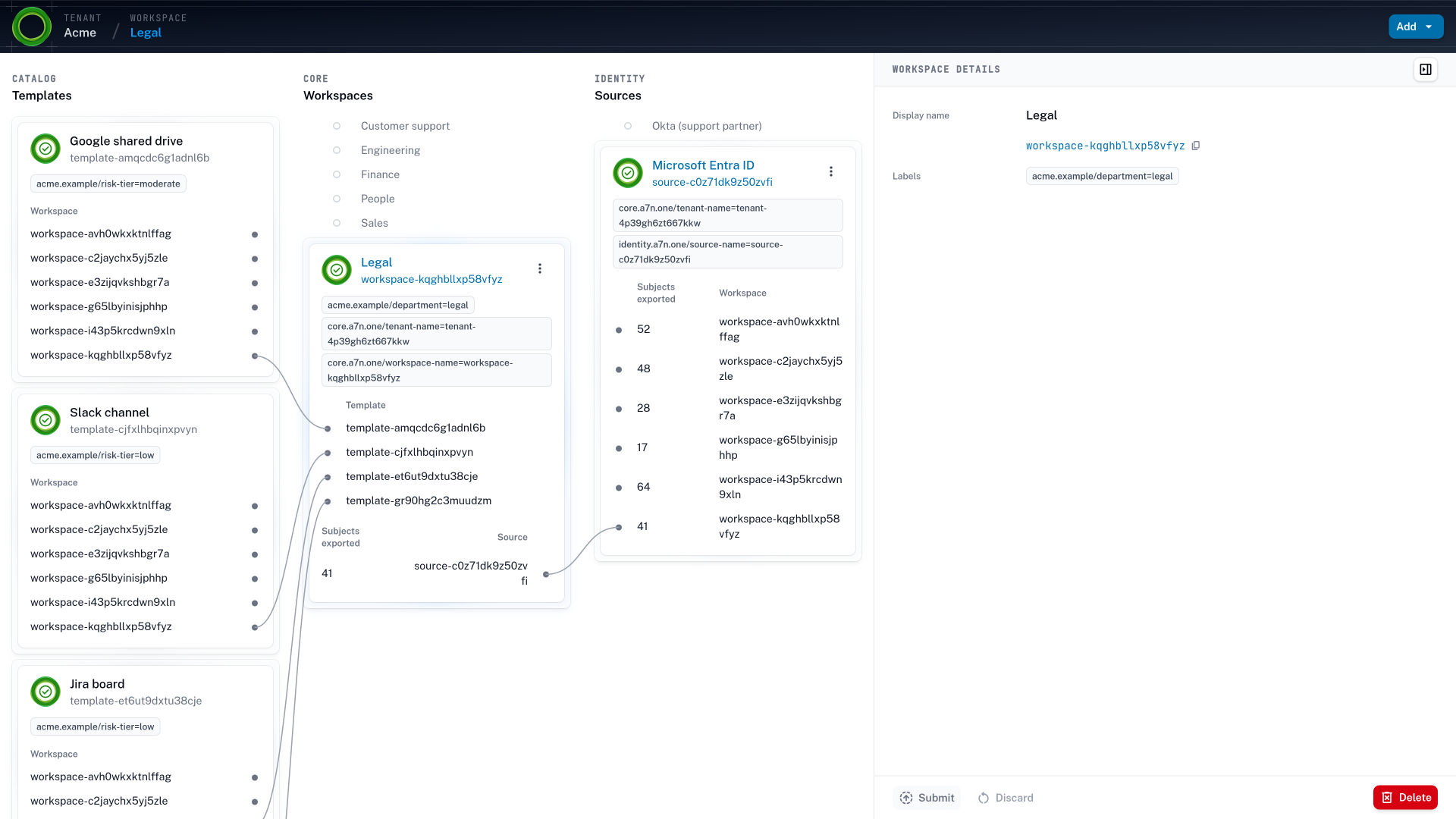
The Acme tenant in Accession1, with its catalog of templates, its six workspaces Legal, Finance, Sales, Customer support, Engineering, and People, and its identity sources, Microsoft Entra ID for employees and contractors by department and Okta for the support outsourcing partner, joined by paths that show which workspace gets which templates and which people
The Acme tenant draws employees and contractors from Microsoft Entra ID by department, and the support partner's people from the partner's own Okta. When someone moves from Finance to Sales in Entra ID, the path they arrive by changes, and so does their access, in one reconciliation rather than a ticket for Sales and a Finance role that stays.

Three kinds of identity Every lifecycle event becomes a batch of provisioning tickets.

Every join, move, and exit of an employee or a contractor is in the identity provider before anyone files a ticket. The tickets repeat it one target system at a time, and only in the direction someone asked for. Agents add changes that no system records at all.

  1. Employees Moved to treasury in April.
    Posts invoices in June.

    A transfer ticket asks only for the new team’s access. A senior accountant moves from accounts payable to treasury in April, and at the June close still holds the ERP role that posts vendor invoices, next to the new one that releases payments.

    In Accession1 your team writes the rule once, and the old roles are revoked on every transfer.

  2. Contractors and partners Hired for weekend shifts.
    Reads every escalation.

    The help desk has one role for everyone who works tickets, and rotations are recorded at the partner. An outsourcing partner covers weekend tickets in Zendesk with a pool of representatives that changes every month. Each gets the in-house role, with VIP escalations and internal notes, and the ones who rotated off are still on the list.

    With Accession1 you grant the partner’s people only their contract’s queues, and access ends when the partner drops them.

  3. AI agents Three agents last month.
    None of them ever left.

    No agent has an identity of its own, so there is nothing to deactivate when its work ends. The marketing team sets up a campaign agent per launch, three last month, each on the Gmail API token of whoever set it up.

    Accession1 helps you give each agent an identity and an owner, so its access ends like a leaver’s.

How it works One identity change, applied in every target system.

  1. Step 1: The identity provider sends a SCIM request

    HR records a hire, a transfer, or a last day, and an administrator adds or removes a contractor. Your identity provider sends each change to Accession1 as a SCIM create, update, or delete request, so the change that used to open a ticket is the trigger.

  2. Step 2: Attributes become labels

    Department, team, location, employment type, and company arrive as labels on the employee, the contractor, or the agent, so what the identity provider knows about an identity is what the rules match.

  3. Step 3: Rules already decided it

    Administrators draw the boundaries and workspace members write the access policies, and the AI assistant drafts both from your organization’s context. The rule that matches the new labels exists before the change arrives, and gives contractors and agents a narrower role.

  4. Step 4: The ERP and the help desk follow the same change

    A target system is integrated through an OpenTofu module. Accession1 configures the ERP, the help desk, and the repositories a transfer used to reach one ticket at a time, all from the same graph.

  5. Step 5: Reconciliation goes both ways

    Continuous reconciliation grants what the new place calls for and revokes what only the old place justified, in each target system that day, so the mover never holds the old team’s access next to the new.

Manual onboarding and offboarding leave orphaned accounts

IT teams have run joiners, movers, and leavers (JML) for years from the hire and termination feed of the HR system. The rest is an onboarding checklist, a spreadsheet of what each role needs, and the memory of whoever handled the last exception. Contractors and partners get a list of their own, kept by a few colleagues with the contract PDF in one place and the guest accounts in another. The people who run it get every new joiner working on day one, and that takes most of their attention. Offboarding gets what is left. A leaver’s identity is disabled or deleted in the identity provider, so the sign-in stops. But the accounts, roles, and shares in each target system stay behind, orphaned, until someone cleans them up by hand. A mover keeps the identity, so the old team’s entitlements stay next to the new team’s. Every transfer adds another layer, and the privilege creep accrues until the next review happens to find it. A spreadsheet can’t grant or revoke anything, so every change becomes a batch of tickets, one per target system, and a faster queue only closes them sooner.

Accession1 is self-service provisioning of resources and access for people and AI agents. Teams decide access inside boundaries administrators set, and Accession1 grants and revokes it as people and agents join, move, and leave.

Joiners, movers, and leavers for AI agents

An employee joins once, moves every few years, and leaves once. Each change is rare enough to handle by hand, and the move is the one that leaks, because the old access outlives its reason by months.

A contractor or a partner’s representative comes for an engagement of weeks or months, so the same headcount brings several times as many joiners and leavers. They should get less than the employees beside them, but the folder or the role in front of them rarely offers anything narrower. And the end is recorded somewhere else, in procurement or in the partner’s own identity provider, so it reaches your target systems late or never.

An AI agent, the non-human identity (NHI) that comes and goes most often, is set up for a project, a workflow, or a launch, sometimes for a single task, and retired when the work is done. It moves when its team reorganizes or its workflow changes, and one team can run more agents than it has people. So agents join, move, and leave on the rhythm of the work rather than of the org chart, far more often than anyone on the payroll. Like contractors, agents need a narrower scope. An agent handles a range of tasks as open as a person’s, works by trial and error, and can exercise a permission a person would never have used.

A process that copes with a few employee changes a month strains with contractors, and it can’t keep up with agents at all. Closing its gaps for employees and contractors now means the first agent a team adds lands in rules that already work, on the way to an agentic organization.

Identity lifecycle automation, from the first day to the last

Take an account executive who moves from the DACH territory to NORAM in April. Sales operations owns the territory and feeds it into the identity provider, so the move is recorded on the day it happens. A request brings the NORAM accounts in HubSpot one ticket at a time, but the DACH accounts stay assigned on top of them. A timer on the DACH access ends it on a date someone guessed, months after the reason ended, and the next move asks again. A usage report keeps DACH, because the account executive still opens those deals to answer a colleague, and trims the NORAM pipeline nobody has touched yet.

In Accession1 the territory becomes a label, and continuous reconciliation grants NORAM and revokes DACH in one pass. The identity lifecycle runs the same way every time: the identity provider sends the change as a SCIM request, the labels on the identity change, and reconciliation brings every grant in line with the new state. An agent identity Accession1 creates in the identity provider goes through the same lifecycle, and there Accession1 records the join, the move, and the retirement itself. The same happens when a partner’s identity provider stops sending a representative, or a team deactivates the agent it set up for a launch. Every grant that came with them goes.

A joiner gets what the workspace’s access policies grant on the first day, scoped to the team’s actual work rather than a static baseline. An agent registered this morning has no usage to derive access from, and it doesn’t need any, because its place in the access graph already says what it gets. On a mover’s first day, a contract’s last, or the day an agent is retired, the record shows what changed in each target system and which rule changed it. So the next access review reads the rule that moved with the account executive, instead of hunting for the DACH grants left over from the move.

Narrower access for contractors, partners, and agents

The more often an identity joins and leaves, the less it should hold while it’s there. In Accession1 outside people come from your identity provider as guest accounts, or from the partner’s own, connected as a separate identity source that administrators scope to the workspaces it serves. Employment type and company arrive as labels, so access policies apply least privilege to contractors and a partner’s people, with a narrower role on fewer resources than the employees beside them. An agent sits in the workspace of the team it works for, and that team is its owner, so its access also ends when the owner moves on. It starts one level below the team, read-only where the team can write.

Context-aware design records your partnerships and the share of contractors in each team, so a workspace that relies on them and handles customer data gets a tighter boundary and a higher risk tier. Self-service inside the workspace can give them less still.

A reorganization is an access policy edit

A renamed team or a department moved under another is a change in the identity provider, and at most an edit to the rules that name it. A team that splits in two is a second workspace and the rules that say which resources go with it. A shared drive handed from one team to another changes its workspace, which moves its ownership and the access to it while the drive stays where it is. Agents carry labels like a person, so they move with their team in the same edit. Reconciliation carries it to every target system, and no approval sits in the path, because no boundary moved.

A merger or a new legal entity is different, because it draws new boundaries. When payroll moves from a subsidiary into the parent company, the AI assistant drafts the new workspace and its rules from the context, and administrators weigh the impact and draw the boundary. The shared drives, channels, and repositories stay where they are while their owners change, so a reorganization never migrates a file.
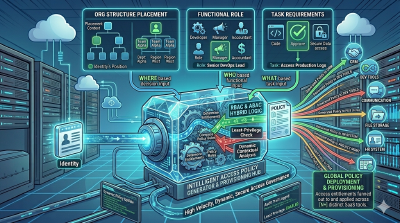
What a change touches Every tool of the old team, the new one, and the partner.

A hire needs Google Workspace or Microsoft 365, Slack, and the team’s tools. A partner works your tickets in Zendesk, and an agent opens pull requests in GitHub. Each should lose all of it on the way out. Microsoft Entra ID, Okta, or Google Workspace sends SCIM requests for employees and contractors to Accession1, and Accession1 manages target systems through OpenTofu modules, so anything with a Terraform provider can join.

  • Microsoft Entra ID
  • Okta
  • Google Workspace
  • Google Drive
  • HubSpot
  • Zendesk
  • Jira
  • GitHub
  • Google Cloud
  • GitLab
  • Kubernetes
  • Snowflake
  • Databricks
  • Datadog
  • Grafana
  • PagerDuty

Takeaways Provisioning and deprovisioning for every identity, both ways.

A move revokes too
A transfer grants the new team’s roles and revokes the access that was exclusive to the former position, in the same reconciliation and without a second request.
Narrower by rule
Contractors, partners, and agents carry labels of their own, so a rule grants them less than the employees beside them, on fewer resources.
Deactivated means revoked
When an identity provider deactivates an identity, Accession1 revokes every derived grant it held everywhere, used or not, and a seat those grants occupied is released with them.
Administrators set the ceiling
Administrators decide which identities, templates, and roles each workspace may use, and nothing a workspace member or agent creates reaches past that.

Dynamic access management Access that changes when the organization does.

Accession1 derives every grant from the current state of identities, resources, and access policies. A hire, a transfer, a team split in two, a drive handed to another team, or a retired agent changes access everywhere in the next reconciliation. Every grant keeps a reason you can name.

How continuous reconciliation works

Frequently asked questions Joiner, mover, and leaver automation FAQ

What is joiner, mover, and leaver automation?

It changes access when an identity joins, moves within, or leaves the organization, which is onboarding, a transfer, and offboarding driven by the identity provider instead of tickets. The industry calls it identity lifecycle management. In Accession1 it covers employees, contractors and partners, and AI agents alike. A joiner gets what its place calls for, a mover swaps the old team’s access for the new team’s, and a leaver is deprovisioned from every target system, because every derived grant ends.

How is this different from birthright rules?

Accession1 does birthright access too, but it doesn’t stop at a baseline. Birthright rules are decided centrally, map a job title to a static set of entitlements, and drift as teams change, so the rest of what a new hire needs ends up in an onboarding doc of people to ask. In Accession1 birthright access comes from each workspace’s access policies, which the team keeps current with the help of the context, inside the rules administrators set.

Doesn't SCIM already automate this?

SCIM creates the person’s account in a target system such as Slack or GitHub, and can push their groups. It doesn’t create the shared drive or the repository, and someone still decides which group grants which role on each one. Your identity provider sends SCIM requests to Accession1 too, and Accession1 then provisions the resources and derives the roles from your rules.

Why do AI agents make joiners, movers, and leavers urgent?

Agents go through all three far more often. An employee joins, moves, and leaves a few times in a career, a contractor with every engagement, and an agent with every project, workflow, or task it’s set up for. A process run from tickets and spreadsheets copes with the first, strains with the second, and can’t keep up with the third, so every gap it leaves today multiplies with agents.

Why not set an expiry date on contractor and agent access?

A timer is not a reason. The date is a guess made when the contract was signed or the agent was set up, so an engagement that runs long breaks on the day it passes, and one that ends early keeps its access until then. In Accession1 access ends when the identity provider ends the identity or the rule stops matching.

Why doesn't a usage report handle movers?

A mover keeps using the old team’s tools for weeks to answer questions and finish handovers, and hasn’t touched the new team’s yet, so a usage report keeps the old access and cuts the new. A contractor who joined this morning and an agent set up an hour ago have no usage at all. Accession1 derives access from where the identity provider says each identity works now.

How does Accession1 prevent orphaned accounts?

An orphaned account is access left in a target system after the identity behind it is gone. For the resources Accession1 manages, every grant is derived from a rule and an identity, so deactivating the identity in the identity provider revokes them in every target system. Nothing Accession1 granted outlives the identity, and an agent’s access ends with its owner too.

What happens in a reorganization or a merger?

A renamed team, a moved department, or a split is a change in the identity provider and an edit to the rules. Reconciliation carries it to every target system, and the drives, channels, and repositories stay where they are. A merger draws new boundaries, so administrators draw them from a draft the AI assistant prepares from the context.

Can a partner give its people more than we allow?

No. A partner’s people come as guest accounts in your identity provider or from the partner’s own, connected as a separate identity source, and administrators decide which workspaces it reaches and which templates and roles those workspaces may use. Rules inside them can give a partner’s people less, and nothing a workspace creates goes beyond what administrators allowed.

What happens to an agent when the person who set it up leaves?

An agent has its own identity and an owner: the person, the workspace, or the tenant it was added to. Deactivating it revokes its grants like a person’s, and when its owner moves on, its access ends with them. AI agent access explains the owner.

From the blog Posts on the identity lifecycle.

All posts